1-Click GitHub Token Theft via VS Code: Webview Sandbox Bypass Exposes Devs
Researcher discloses VS Code webview keyboard injection vulnerability: one click steals your GitHub OAuth token. Microsoft fixed it as 'Moderate' severity.
Public-source compilation
Synthesized from public posts/docs. Prefer the original source for primary claims.
TL;DR
On June 3, 2026, security researcher Ammar Askar disclosed a critical VS Code vulnerability: an attacker can steal your GitHub OAuth token — including access to private repos — by simply getting you to click a link. The exploit abuses the github.dev web-based VS Code editor, using keyboard shortcut injection to bypass the webview iframe sandbox. Microsoft has fixed the bug but rated it only "Moderate" severity, sparking community debate.
Key facts:
- Type: Remote Code Execution via github.dev webview sandbox bypass
- Entry point: A single malicious GitHub repo with a README.ipynb (Jupyter Notebook)
- Impact: All github.dev users
- Fix status: Patched by Microsoft, rated Moderate
- HN traction: 266 points, 34 comments
How It Works: From One Click to Token Theft
Security researcher Ammar Askar, a computer scientist specializing in programming languages and security, published a detailed writeup of the full attack chain.
Entry Point: github.dev
GitHub has a handy feature: change github.com to github.dev in any repo URL, and you get a lightweight VS Code running entirely in your browser. This browser VS Code is remarkably powerful — you can view all files (including private repos), send pull requests, and even make commits.
Under the hood, github.com POSTs an OAuth token to github.dev that lets it act on your behalf across all your repositories:
"The token is not scoped to the particular repo you interact with. It has access to all your repos."
Step 1: Webview Sandbox Bypass
VS Code uses <iframe> based webviews for security isolation: webview content runs under the vscode-webview:// origin, separate from the main editor's vscode-file:// origin. JavaScript executing inside the webview should be fully contained.
But VS Code implements keyboard shortcut message passing for better UX. When you press Ctrl+Shift+P inside a webview, the command palette still appears:
contentWindow.addEventListener('keydown', handleInnerKeydown);The critical flaw: a malicious script running in the webview can simulate keyboard events. While the browser won't treat programmatic keystrokes as real user input for Ctrl+Shift+P itself, VS Code has a massive set of built-in keyboard shortcuts that listen directly on keydown.
Step 2: Keyboard Injection Attack
The researcher found he could simulate a chain of keyboard events to:
- Simulate
Ctrl+Shift+A→ Accept the "recommended extension" notification - VS Code reads
.vscode/extensions.jsonfrom the repo for extension recommendations - The malicious repo declares a malicious extension
VS Code 1.97's Publisher Trust system normally blocks unsigned extensions — but there's a bypass: local workspace extensions. In trusted workspaces (github.dev is always trusted), .vscode/extensions.json can declare local extensions. While CSP blocks direct loading, extensions can contribute custom keybindings via package.json, creating a full command chain.
Step 3: Full Attack Chain
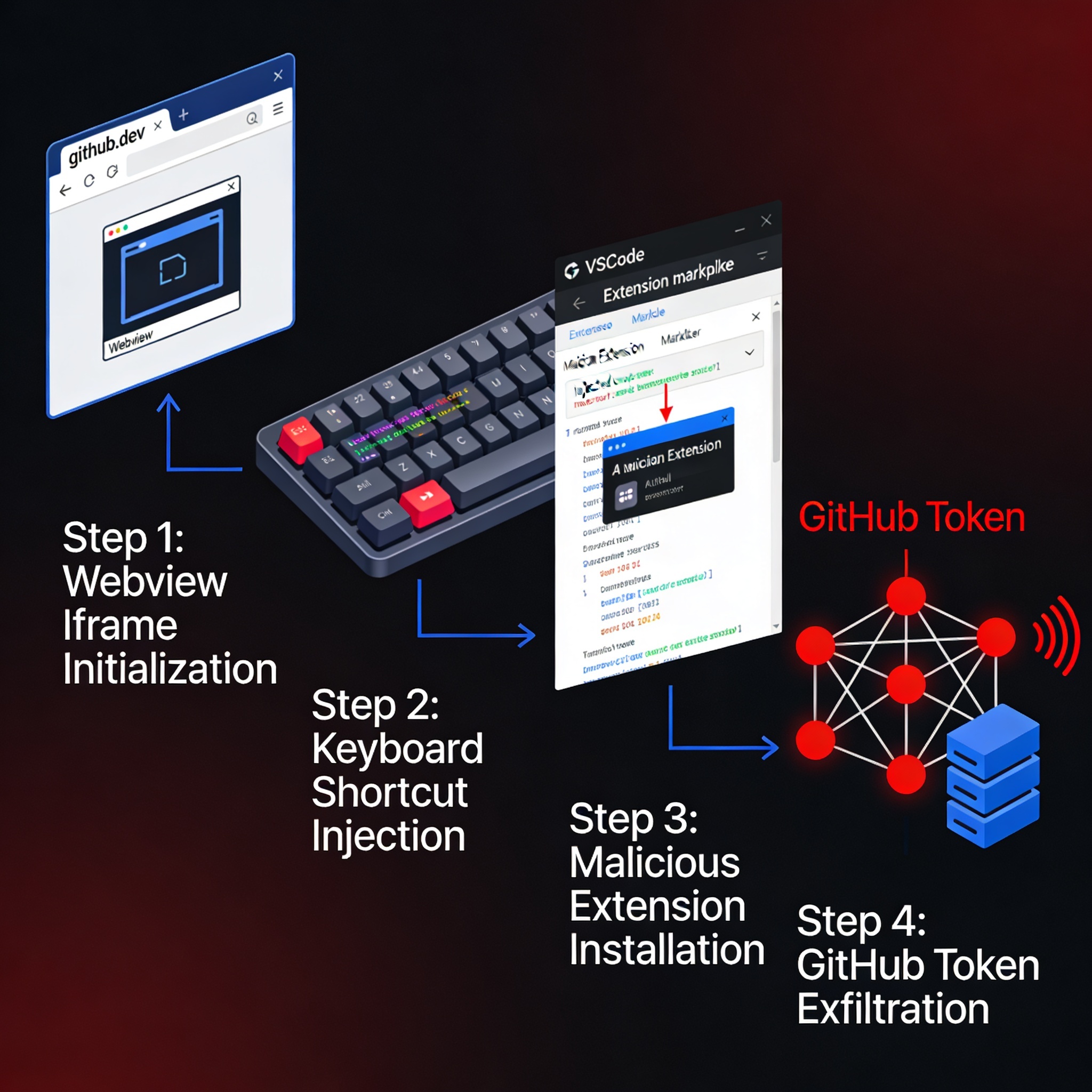
The attack executes in 5 stages:
| Step | Action | Detail |
|---|---|---|
| 1 | Victim clicks malicious link | Redirects to github.dev opening a malicious repo |
| 2 | Webview loads README.ipynb | Notebook HTML output contains malicious JS payload |
| 3 | JS simulates keyboard shortcuts | Ctrl+Shift+A accepts extension recommendation |
| 4 | Malicious extension installed | Extension contributes custom keybindings to trigger commands |
| 5 | Extension exfiltrates GitHub token | Queries api.github.com/user/repos to read all repos |
Full proof-of-concept code: github.dev-token-steal-poc
Desktop VS Code Affected Too
This vulnerability also exists in the desktop version of VS Code, though the attack surface is smaller:
- github.dev: One click triggers the attack — no user confirmation needed if you've visited github.dev before
- Desktop VS Code: Requires the victim to clone a malicious repo and open the notebook — harder to pull off, but consequences are worse (Electron JS execution = full RCE)
Microsoft's Fix and the Controversy
Microsoft fixed the vulnerability but rated it "Moderate" severity. The researcher expressed frustration:
"The last time I interacted with MSRC regarding reporting a VS Code bug, it was a horrible experience where they silently fixed the bug I pointed out without any credit. They also marked it as a duplicate."
He ultimately chose public disclosure to pressure Microsoft's security response:
"To those folks, I am sorry, but this is one of the few levers I have to try to influence MSRC and the security posture of VSCode."
HN Community Response
The Hacker News discussion focused on root cause analysis. Key insight from one commenter:
"Zooming way out, it's a pity that the web embedded VSCode editor is signed into GitHub at all. Defense-in-depth or not, a huge vulnerability surface arises from that origin having an OAuth token."
The community largely thanked the researcher for essentially donating his time — he could have sold this to a zero-day broker but chose to disclose publicly.
3 Actionable Recommendations for Developers
1. Clear github.dev Browser Data
If you've never used github.dev, there's one dialog to click through. But once past that, attacks trigger silently. Immediately clear github.dev site data:
- Browser Settings → Privacy → Site Data
- Search for
github.dev - Delete all stored data
2. Audit Your VS Code Extension Security
Check if your team uses workspace-recommended extensions (.vscode/extensions.json). While useful, this is an attack surface. Best practices:
- Only install extensions from verified publishers
- Be cautious opening unknown repos on github.dev
- Consider using a separate browser profile for github.dev
3. Pay Attention to AI Agent Tool Security
This vulnerability illustrates how AI-era development tools expand the attack surface. Web-based IDEs, AI coding agents (Claude Code, Codex, Cursor), and automation workflows all create new attack vectors.
Want to secure your AI coding tools? Check out: AI Coding Agent Security Configuration Guide: Sandbox Claude Code/Codex in 3 Steps
Security research is also profitable — read about: Security Researcher Makes $10,000/Month with Claude Code Bug Bounties
Sources
Related Reading
- Master AI Agent security: AI Coding Agent Security Guide
- Bug bounty as a career: Security Researcher's $10K/Month Case Study
Topic hub
AI Coding Tools Hub (2026)
From Copilot pricing changes to Claude Code + DeepSeek cost-saving setups—one place to compare tools, read explainers, and follow tutorials.
Explore AI Coding Tools Hub (2026) →Monetization angle
How can you make money from this trend?
WayToClawEarn focuses on verified earn playbooks—not just news. Start from these cases.
AI code review & spec-driven agency
Offer migration consulting as Copilot pricing shifts
Claude Code 48h Micro SaaS
Validate products fast with a low-cost agent stack
Related tutorials
- Claude Code Too Expensive? Cut 90%+ Cost with DeepSeek V4 in 10 Minutes
- GitHub Copilot Pricing 2026: Plan Comparison, Monthly Cost, and 3 Ways to Save
- How to turn off signature in VS Code Copilot AI: remove Co-Authored-by with one line of command
- Copilot vs Cursor vs Claude Code (2026): Which Should You Pick?
Related news
- OpenAI Models Land on Google Cloud: Three-Cloud Coverage Complete, Codex Agent Workflows How to Choose
- Anthropic Launches Claude Duet: Proactive AI Agent vs Meta Muse vs OpenAI Dots — How to Choose
- DeepSeek V4.1-Flash-1017 Full Switch: 11 Benchmarks Up, How to Cut Agent Costs?
- DeepSeek Harness v0.2 Desktop Launch: Zero-Config AI Coding Agent, How to Choose?